
Create a Room
Start a private online game room, choose your setup, and invite players instantly.
Create Private RoomBest for hosting your own game with friends, classmates, or coworkers.
Play a free social deduction party game online. Create a private room with friends or join with a 6-character code for 3-99 players, QR invites, live sync, built-in timers, and voting. No app download or signup required for Guest Rooms.
Start a private online game room, choose your setup, and invite players instantly.
Create Private RoomBest for hosting your own game with friends, classmates, or coworkers.
Have a room code? Enter it below and jump straight into the game.
Playing together in the same room? Try Local Mode on one shared device.
Start Local ModeNo app download - Each player uses their own device - 3-99 players - Room code or QR invite - Guest Rooms with no signup
Hosting an online game is simple. Create a room, share the invite, and let each player join on their own device while the game keeps everyone synchronized.
Start a private room, choose your word pack, and set your round options before inviting your group.
Players join with the 6-character room code or a QR invite and enter with their own nickname.
Each game moves through clue, discussion, voting, and reveal while all players stay synchronized in real time.
The room handles vote collection, role reveals, and end-of-round resolution automatically so each round lands clearly.
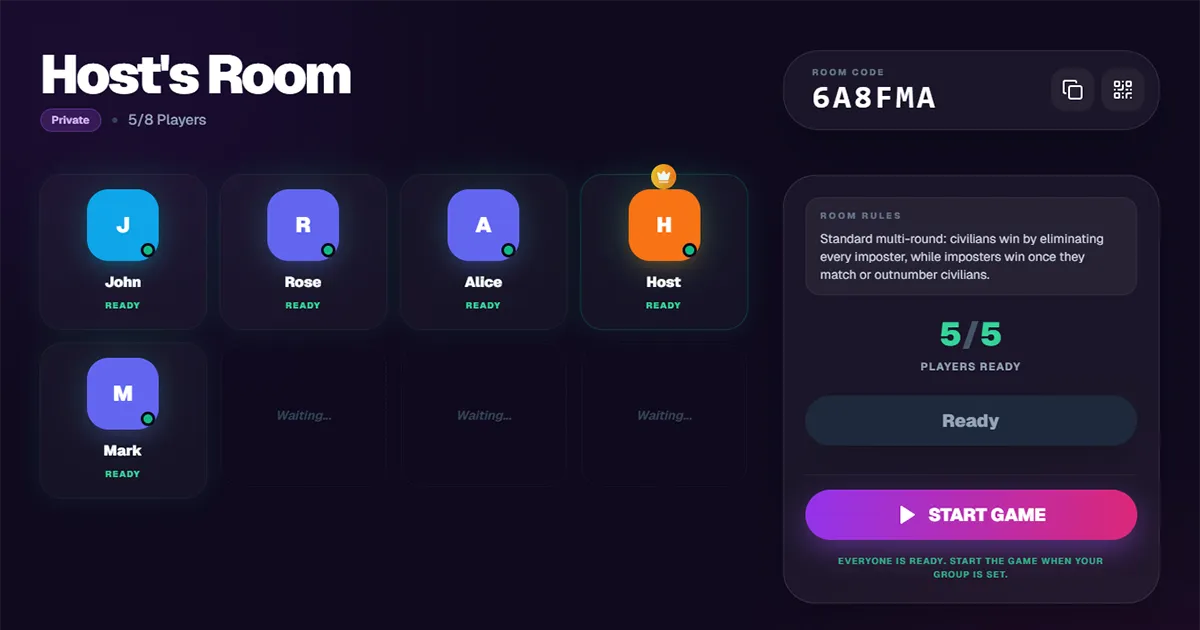
Play online in your browser with quick setup, cross-device access, and no app installation. Need an unblocked Imposter Game? The Imposter Game Chrome extension gives players an extra Chrome-based way to access the game when regular browser access is limited, making it useful for classrooms, school clubs, and team sessions.
Players can join from a browser without installing an app or passing one device around.
Online rooms are easy to join across desktop, tablet, and mobile browsers with the same synced game state.
Use the same online room flow for casual game nights, classroom icebreakers, and team sessions.
Use the Imposter Game Chrome extension as an extra access option when regular browser play is limited, especially for approved classroom, school club, or team activities.
Open Chrome ExtensionOnline rooms focus on the core tools that help groups join fast, stay synchronized, and move cleanly through each round.
Invite players with a short code that is easy to share and quick to enter.
Let players join even faster by scanning a QR invite on their phone.
Keep clue, discussion, voting, and reveal states synchronized across all devices.
Keep rounds moving with guided timing instead of relying on a separate moderator timer.
Collect votes cleanly and reveal the round result automatically.
Start quickly with curated word libraries designed for replayable social deduction sessions.
Choose the mode that fits your group best. Online Rooms work best when players use separate devices or join from different places. Local Mode is better when everyone is together around one shared screen.
If you are not ready to start a room yet, use the pages below to learn the rules, browse word packs, or prepare a custom session.
Learn the rules, round flow, and win conditions before hosting your first game.
Read the rulesBrowse ready-made word packs for parties, classrooms, and themed game nights.
Browse word packsNeed custom words? Use the Imposter Game Word Generator to create themed word lists before your next online room.
Use the GeneratorPlaying face to face on one device? Use the shared-screen Local Mode instead.
Start Local ModeYes. You can create or join a browser-based room and start playing online without downloading an app.
Online rooms support 3-99 players. If everyone is together in one place, Local Mode is also available for shared-device sessions.
Online rooms are designed for at least 3 players and support up to 99 players. Two players can test the setup, but the game is more fun with at least 3 players because discussion and voting work better with a group.
Enter the 6-character room code shared by the host, or scan the QR invite on your mobile device if available.
No. The game runs directly in the browser and works on desktop, tablet, and mobile devices.
Official word packs are available by default. Custom or generated word packs may also be available where enabled for the selected setup or plan.
Online rooms let each player join on their own device with real-time synchronization. Local Mode is designed for in-person groups sharing one device in the same room.
Yes. Some players spell it Impostor Game, while others search for Imposter Game. This page lets you play the same online social deduction game in your browser.
Yes. Imposter Game runs in your browser with no download required, and the Imposter Game Chrome extension provides an extra unblocked play option in Chrome when regular browser access is limited. Availability may still depend on device settings and local school or workplace policies.
Want to discover drop-in public game rooms? Public room discovery is still being tested, so live room availability may vary. Private rooms are currently the fastest and most reliable way to play online.
Search by room name if public discovery is available in your region.
The arenas are quiet at the moment. Public room discovery is still in beta, so availability may vary by time and region.
If you do not see an open room right now, create a private room and invite your own group directly.
Create Your Own RoomCreate a private room for your group or join with a code in seconds.